
If you’ve ever wondered why some Starlink installs run cables across an entire building while others seem limited to a few metres, the answer comes down to one thing: voltage.
The Starlink Gen 3 Standard and the Starlink Mini are both capable satellite internet terminals, but they operate at different voltages, draw different amounts of current, and that means the rules around cable length are completely different for each one.
Get it wrong and you end up with a connection that drops out under load, a terminal that won’t stay online, or a cable run that looks fine on paper but fails in the field.
This post breaks down the real limits for both terminals, explains why those limits exist, and points you to the Air Vision Systems AVS Starlink Smart Cable Calculator so you can work out the right cable length for your specific install.
The figures in this post come directly from engineering compliance reports prepared for Air Vision Systems, so you’re not working from guesswork – you’re working from verified calculations.
The Engineered Answer
Starlink Gen 3 – Cat6A 24 AWG structured cabling:
- At 57 V: compliant up to 100 m
- At 48 V: compliant up to 90 m (24 AWG) or 70 m (26 AWG)
- Direct 12 V supply: non-compliant – step-up converter to 57 V required
Starlink Mini – two-conductor DC cable at 30 V:
- 20 AWG: compliant up to 30 m
- 18 AWG: compliant up to 60 m
- 16 AWG: suitable for runs beyond 60 m
- USB-C PD at 20 V: compliant up to 5 m with a certified e-marked 5 A cable
- Direct 12 V supply: non-compliant beyond 2 to 3 m – step-up converter to 30 V required
All figures calculated using verified copper conductor resistance values at 25 degrees Celsius with a 90% minimum voltage retention criterion at the device input.
Source: Air Vision Systems Engineering Compliance Reports.
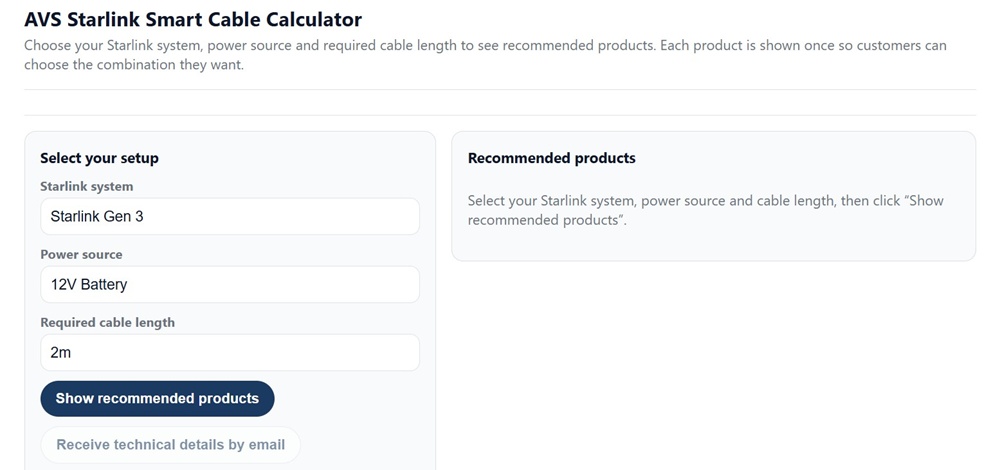
The Air Vision Systems AVS Starlink Smart Cable Calculator – select your terminal, power source and required cable length to see recommended products.
Why Voltage Determines How Far You Can Run a Cable
Every cable has resistance. The longer the cable, the more resistance, and the more voltage you lose between the power source and the terminal. This is called voltage drop.
The critical rule – confirmed across both Air Vision Systems engineering reports – is that the terminal must receive at least 90% of the source voltage to operate reliably. Drop below that threshold and you risk dropouts, instability, or the terminal failing to stay online under load.
Here’s where voltage becomes the key variable. Higher voltage means lower current for the same amount of power. Lower current means less voltage drop across the cable. Less voltage drop means you can run the cable further before you hit that 90% limit.
This is exactly why the Gen 3 and Mini have such different cable length limits. They operate at different voltages, draw different currents, and respond very differently to long cable runs.
The math is straightforward once you understand it and the Air Vision Systems Smart Cable Calculator handles it for you automatically. But first, it helps to understand what each terminal actually needs.
Starlink Gen 3: High Voltage, Long Runs
The Gen 3 Standard terminal draws between 75 W and 100 W under continuous operation. Its native operating voltage is 57 V DC – the output of the official Starlink power supply.
That high voltage is what makes long cable runs possible. At 100 W and 57 V, the current in the cable is only around 1.75 A. Low current means low voltage drop, which means you can run the cable a long way before you hit the 90% compliance threshold.
The Air Vision Systems engineering report confirms the following safe cable lengths for Gen 3 using Cat6A 24 AWG structured cabling:
• At 57 V – compliant up to 100 m
• At 48 V – compliant up to 90 m using 24 AWG, reduced to 70 m on 26 AWG
These are real, calculated limits based on verified copper resistance values at 25 degrees Celsius – not estimates.
One important note on 12 V: direct 12 V supply to the Gen 3 is non-compliant. At 100 W, a 12 V source pushes over 8 A through the cable and voltage drop at that current level is severe. If your power source is 12 V, a step-up converter to 57 V mounted close to the source is the correct solution, with Cat6A running the distance from there.

Figure 1: 12 V battery supply with step-up to 57V, distributed over Cat6A backbone to Starlink Gen 3
System architecture: 12 V battery supply stepped up to 57 V, distributed over Cat6A backbone to Starlink Gen 3. Source: Air Vision Systems (AVS) Engineering Compliance Report
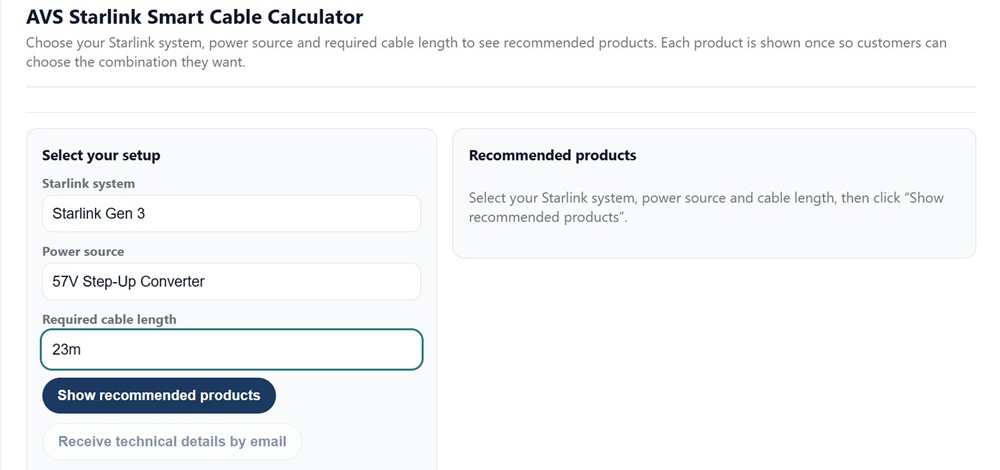
Air Vision Systems AVS Starlink Smart Cable Calculator: Starlink Gen 3 with 57V Step-Up Converter selected – the recommended power path for long Gen 3 cable runs.
Starlink Mini: Lower Voltage, Shorter Runs
The Starlink Mini draws between 20 W and 40 W – significantly less than the Gen 3. But its lower operating voltage is what limits how far you can run a cable.
The Mini operates on either 20 V USB-C Power Delivery for short runs, or 30 V regulated DC for longer installations. At 40 W and 30 V, current in the cable sits at around 1.33 A – higher than the Gen 3 at 57 V for a proportionally smaller load, which means voltage drop accumulates faster relative to the source voltage.
The Air Vision Systems engineering report confirms the following safe cable lengths for the Mini using two-conductor DC cable at 30 V:
• 20 AWG – compliant up to 30 m
• 18 AWG – compliant up to 60 m
• 16 AWG – suitable for runs beyond 60 m

Figure 2: 12 V supply stepped up to 30 V and delivered over 20 AWG cable to Starlink Mini
System architecture: 12 V supply stepped up to 30 V and delivered over 20 AWG two-conductor cable to Starlink Mini. Source: Air Vision Systems (AVS) Engineering Compliance Report
For USB-C PD at 20 V, only certified e-marked 5 A cables are compliant, and the maximum length is 5 m. A non-e-marked cable is not suitable at this length – the e-marked certification is non-negotiable. Beyond 5 m, switch to 30 V DC distribution.

Figure 3: Direct USB-C PD adapter and <=5m certified cable powering Starlink Mini
System architecture: Direct USB-C PD adapter with certified e-marked cable powering Starlink Mini. Maximum cable length is 5 m with a certified e-marked 5 A cable. Source: Air Vision Systems (AVS) Engineering Compliance Report
Direct 12 V supply is non-compliant beyond 2 to 3 m. A step-up converter to 30 V mounted close to the 12 V source is required for any meaningful cable run – with the two-conductor DC cable carrying the 30 V from there to the terminal.
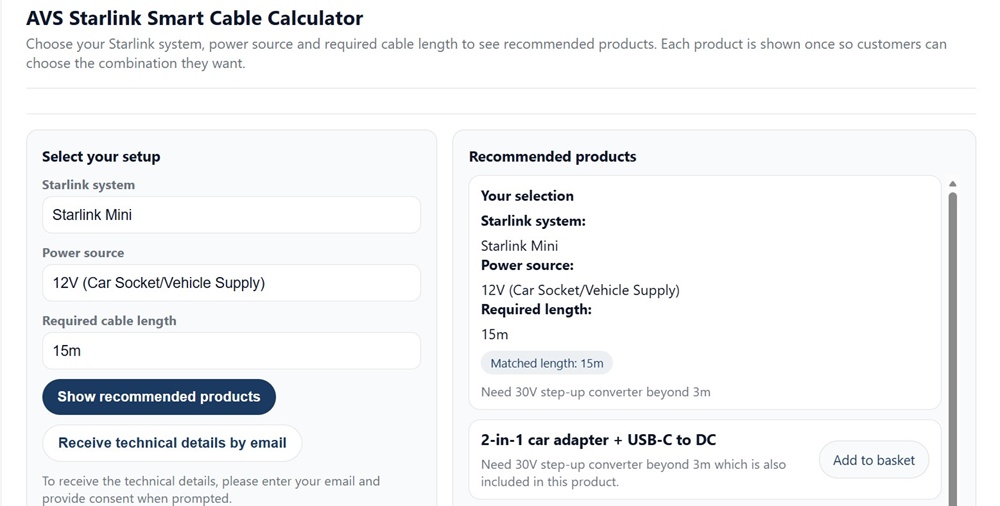
Air Vision Systems (AVS) cable calculator: Starlink Mini with 12V source at 15m – the calculator identifies the step-up converter requirement and recommends the correct products for a compliant installation.
Gen 3 vs Mini: Side by Side
The differences between the two terminals become clear when you put the key figures next to each other.
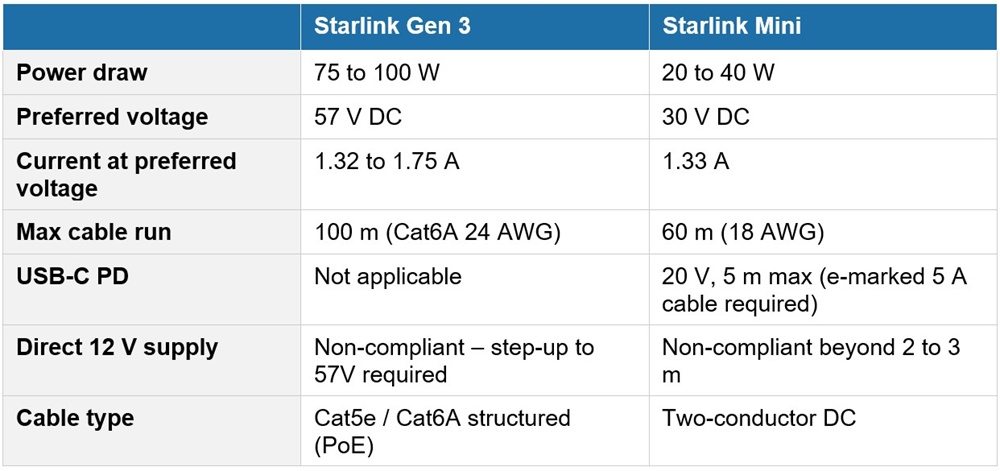
The Gen 3 wins on cable distance because of its higher operating voltage, not because it is a more powerful device. The Mini’s lower voltage means it reaches the 90% drop threshold sooner, even though it draws less power overall.
Both terminals share the same 12 V limitation – and both require a step-up converter if 12 V is your only available source.
Extending Your Run Further: Structured Cabling and High Voltage Backbones
For installations where even 60 or 90 m is not enough, both terminals can be served by a high voltage distribution backbone using standard Cat5e or Cat6A structured Ethernet cabling.
The principle is straightforward. Instead of running power at 30 V or 57 V directly to the terminal, you distribute at 48 V or 57 V over the structured cable run, then place a local step-down converter near the terminal to deliver the correct input voltage at that end.
The Air Vision Systems engineering report confirms the following for 48 V and 57 V backbones using Cat6A 24 AWG with two pairs per polarity:
• At 57 V – compliant up to 100 m for both Gen 3 and Mini installations
• At 48 V – compliant up to 90 m
Cat5e and Cat6A perform identically for DC voltage drop at the same conductor gauge. Cat6A is the recommended choice for outdoor, marine, or industrial environments where mechanical durability and termination quality matter.
This architecture is particularly useful for permanent builds – caravans with structured wiring, commercial vehicles, buildings, and marine vessels where a single backbone cable serves multiple devices and the Starlink terminal is one of several endpoints.

Figure 4: 12 V stepped up to 48/57 V backbone, with local step-down converter near Starlink Mini
System architecture: 12 V supply stepped up to 48/57 V backbone over Cat5e/6/6A, with local step-down converter near Starlink Mini. Source: Air Vision Systems (AVS) Engineering Compliance Report
Engineering Note
The cable length limits in this post are drawn directly from Air Vision Systems electrical engineering compliance reports prepared to international standards including IEEE 802.3bt, IEC 60228, and AS/NZS 3000. All figures are calculated using verified copper conductor resistance values at 25 degrees Celsius and a 90% minimum voltage retention criterion at the terminal input. These are not estimates or general guidelines – they are engineered limits you can use with confidence in your installation planning.
Engineer’s Statement
“The analyses contained in this report were performed using standardised electrical engineering methods, verified copper conductor resistance data at 25 degrees Celsius, and a conservative 90 percent minimum voltage retention criterion aligned with IEEE 802.3bt, IEC 60228, and AS/NZS 3000.
All cable length limits, conductor sizing recommendations, and converter placement guidance presented here are traceable to the Air Vision Systems compliance reports and are suitable for use in installation planning and technical documentation.
Installers should verify end-to-end voltage under full load conditions prior to commissioning any installation.”
Electrical Engineer (PEC) | Air Vision Systems Compliance Pack 2025
Not sure which cable length you need for your install?
The Air Vision Systems Smart Cable Calculator takes the guesswork out of it. Enter your terminal type, power source and required cable length and it tells you exactly what you need – based on the same engineering principles in this post.
Use the Air Vision Systems (AVS) Starlink Smart Cable Calculator
Frequently Asked Questions
Can I use the same cable for both Starlink Gen 3 and Starlink Mini?
Not directly. The Gen 3 uses Cat5e or Cat6A structured Ethernet cabling as part of a PoE-style power delivery system, while the Mini uses two-conductor DC cable at 30 V or a USB-C PD cable for short runs. The cable types, connectors, and voltage levels are different for each terminal. If you are running a high voltage backbone at 48 V or 57 V with a local step-down converter, the same structured cabling infrastructure can serve both – but the final connection to each terminal will differ.
Why does the Starlink Mini have a shorter maximum cable run than the Gen 3 if it uses less power?
Because cable run limits are determined by voltage, not power. The Mini operates at 30 V while the Gen 3 operates at 57 V. Lower voltage means higher current for a given load, and higher current means more voltage drop per metre of cable. Even though the Mini draws far less power than the Gen 3, its lower operating voltage means it hits the 90% compliance threshold sooner.
Can I run a Starlink cable longer than 100 m?
The 100 m limit applies to standard structured cabling runs at 57 V using Cat6A 24 AWG. Beyond 100 m, voltage drop exceeds the 10% compliance threshold. If your installation genuinely requires a longer run, the correct approach is to use a signal repeater or a mid-point converter to restore voltage rather than simply extending the cable.
Do I need a special cable for Starlink or will any Ethernet cable do?
For the Gen 3, the cable needs to carry both data and DC power in a PoE configuration, so cable quality matters. Cat6A 24 AWG is recommended for its mechanical durability and termination reliability, particularly in outdoor or demanding environments. Cat5e with 24 AWG conductors is electrically equivalent for DC purposes but less robust physically. For the Mini on 30 V DC, standard two-conductor DC cable in the correct AWG gauge is what you need – not Ethernet cable.
What happens if my cable run is too long – will my Starlink just stop working?
Not necessarily all at once. When voltage drop pushes the terminal input below 90% of the source voltage, the most common symptoms are intermittent dropouts, instability under load, or the terminal struggling to maintain a connection during peak usage. In some cases the terminal may appear to function normally at low load but fail when demand increases. Persistent undervoltage can also stress internal components over time. The safest approach is to size your cable correctly from the start – which is exactly what the Air Vision Systems Smart Cable Calculator is designed to help you do.
The Right Cable Length Makes the Difference
The Starlink Gen 3 and Starlink Mini are both excellent terminals, but they are not interchangeable when it comes to cabling. The Gen 3’s higher operating voltage gives it a clear advantage on cable distance. The Mini’s flexibility on power input makes it versatile, but that flexibility comes with stricter limits on how far you can push a cable run before voltage drop becomes a problem.
The good news is that none of this needs to be guesswork. The engineering is well understood, the limits are clearly defined, and the Air Vision Systems Smart Cable Calculator puts those calculations in your hands in seconds.
Whether you are planning a vehicle install, a marine build, a remote property, or a permanent commercial fit-out, getting your cable length right before you buy saves time, money, and frustration on the day of installation.
Air Vision Systems manufactures cables specifically for Starlink installs – sized, terminated, and tested for the job. If you know your run length, we can sort the rest.
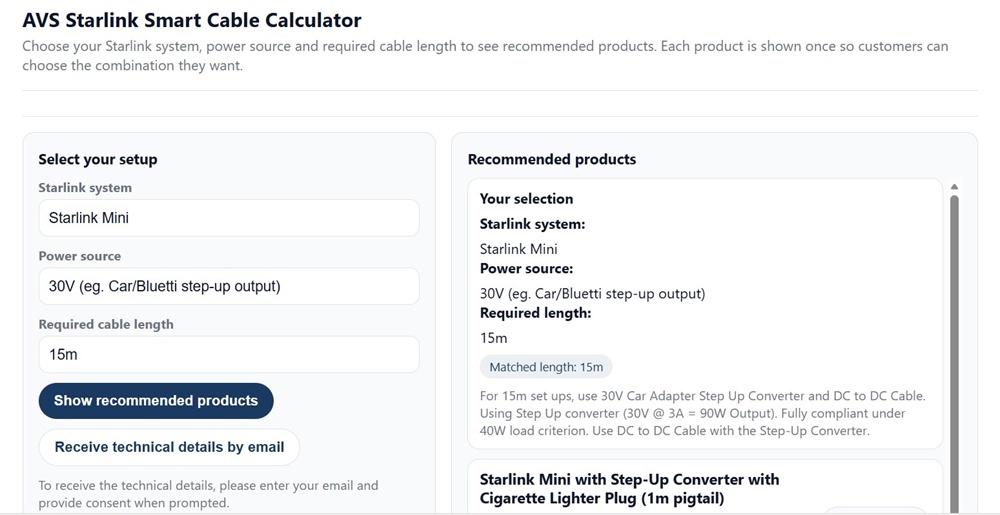
Air Vision Systems (AVS) Starlink Smart Cable Calculator: Starlink Mini with 30V step-up output – showing full product recommendations including matched cable lengths and step-up converter options.
Use the Air Vision Systems Smart Cable Calculator to find the right cable for your run length and terminal type.
Use the Air Vision Systems AVS Starlink Smart Cable Calculator
Browse Air Vision Systems Starlink Cables and Power Supplies/Step-Up Converters