
Electrical Engineer (PEC Registered) | Air Vision Systems Compliance Pack 2025 | NZ and AU
Portable power stations have become the go-to power source for camping, overlanding, marine day trips, and remote work setups across New Zealand and Australia. And with Starlink Mini being compact enough to take anywhere, the combination makes obvious sense. But plug them together the wrong way and you will either get a dropped connection, an unstable terminal, or a cable run that falls outside safe electrical limits before you have left the campsite.
The good news is that most modern portable power stations, including popular units like the Bluetti AC2P, are well suited to running Starlink Mini. The question is not whether it works, it is how you connect them and how far you can run the cable. USB-C PD and 30V DC are both viable options, but they have very different limits, and the wrong choice for your setup can cause real problems.
This post is based on a formal electrical engineering report prepared for Air Vision Systems, analysing power delivery compliance for Starlink Mini across USB-C PD and DC cable configurations using portable power stations as the source. The technical findings have been translated into plain English so you can get your setup right first time, whether you are at a campsite, on the water, or somewhere well off the grid.
What Your Portable Power Station Actually Outputs and What the Starlink Mini Needs
Before getting into cables and lengths, it helps to understand what is happening electrically on both sides of the connection.
The Starlink Mini draws between 20 and 40 watts in normal operation. It accepts two input types: 20V via USB-C Power Delivery, and 30V regulated DC. The Mini will not run directly from a 12V or 24V DC output without a converter stepping the voltage up first, because anything below 20V falls outside its operating range and the terminal simply will not start or will drop out under load.
Most quality portable power stations offer a range of outputs that map onto these requirements quite well. A unit like the Bluetti AC2P, for example, provides a 20V USB-C PD port rated at up to 5A (100W), a 12V DC output socket, and a 230V AC output. That gives you three practical connection paths to the Starlink Mini. The first is USB-C PD directly from the USB-C port for short runs up to 3 metres. The second is 30V DC via a step-up converter plugged into the 12V DC socket, stepping the voltage up before it travels down the cable to the dish. The third is 30V DC via the Starlink Mini’s standard mains power adapter plugged into the 230V AC output, with the DC cable running from the adapter to the dish.
The engineering report is clear on which of these paths works, for how long, and what cable you need for each. The short version: USB-C PD works well for short runs, 30V DC is the better choice for anything longer, and 12V or 24V direct without a converter is off the table for any meaningful cable length.
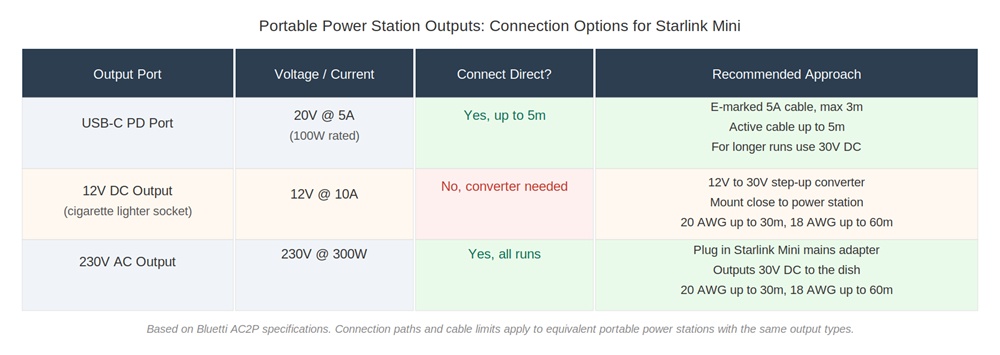
Figure 1: Portable power station output types and recommended connection approach for Starlink Mini. Based on Bluetti AC2P specifications from the engineering report.
USB-C PD: The Quick Connect Option and Its Limits
USB-C Power Delivery is the most convenient way to connect Starlink Mini to a portable power station. Most power stations have at least one USB-C PD port, the cable is easy to source, and there is no converter involved. For short setups, think power station sitting next to the dish, or inside a vehicle with a short run to the roof, it is a clean and reliable solution.
The engineering report confirms that certified e-marked 5A USB-C cables are fully compliant up to 3 metres at 20V. At that length, voltage drop is minimal and the Starlink Mini receives stable, compliant power. The pass/fail threshold used throughout the report is that the device must receive at least 90% of the source voltage. At 20V that means no less than 18V at the terminal. Up to 3 metres on a certified cable, that is comfortably met.
Beyond 3 metres the picture changes. Passive USB-C cables, even certified e-marked ones, are not rated for power delivery beyond 3 metres under USB-IF specifications. Voltage negotiation becomes unstable, and the terminal may drop out or fail to start even if the raw voltage numbers look acceptable. Active chip-assisted cables can extend this to around 5 metres, but only if the manufacturer specifically confirms full Power Delivery compliance at 20V. Not all active cables are created equal.
The practical takeaway: if your power station is within 3 metres of the dish, USB-C PD is a great option. If your run is longer than that, switch to 30V DC distribution. It is not a workaround. It is the engineered solution for exactly this scenario.
30V DC: The Better Choice for Longer Runs
If your cable run is longer than 3 metres, which covers most real-world camping, caravan, and marine setups, 30V DC distribution is the right approach. The physics are straightforward: running at 30V instead of 20V reduces the current for the same power load, and lower current means less voltage drop per metre of cable. That is what allows you to run meaningful distances without falling outside compliance.
At 30V and 40W continuous load, the Starlink Mini draws approximately 1.33 amps. The engineering report validates the following safe cable lengths for two-conductor copper cable:
• 20 AWG: up to 30 metres
• 18 AWG: up to 60 metres
• 16 AWG: for runs beyond 60 metres
These are conservative figures based on worst-case continuous load, meaning the Mini running flat out at 40W the entire time. In practice, the terminal often draws less than this, which gives you additional margin on top of the validated limits.
If your setup is vehicle-based, see our separate post on how far you can run a Starlink Mini cable in a vehicle for vehicle-specific cable length guidance.
One important note on portable power station outputs: most units do not have a native 30V DC output. There are two practical ways to achieve 30V DC from a portable power station. The first is to use a step-up converter plugged into the 12V DC output socket, stepping the voltage up to 30V before it travels down the cable to the dish. Mount the converter as close to the power station as possible to keep the high-current 12V input section short. The second is to plug the Starlink Mini’s standard mains power adapter into the 230V AC output on the power station, which outputs 30V DC directly to the dish via the DC cable. Both methods deliver the same compliant 30V DC and the same cable length limits apply.
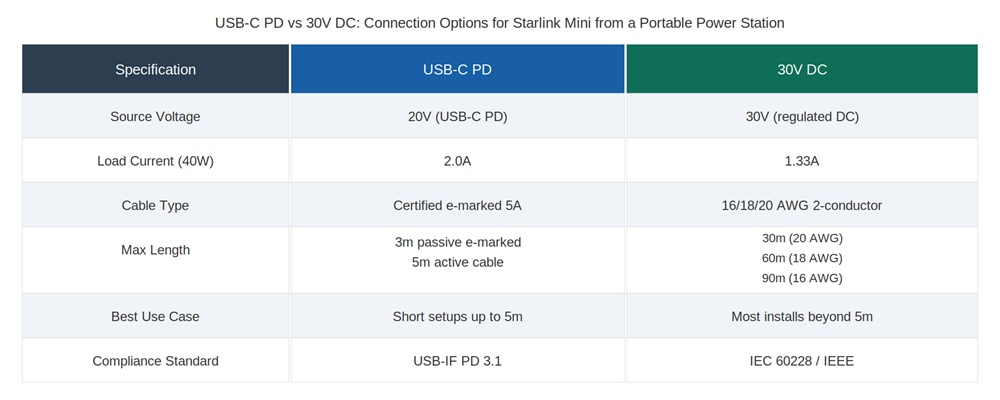
Figure 2: USB-C PD vs 30V DC connection options for Starlink Mini. For runs beyond 3 metres, 30V DC is the engineered solution.
What About 12V and 24V DC Outputs?
Most portable power stations include 12V DC outputs, sometimes 24V as well, and it is a natural instinct to reach for these when powering accessories. For many devices they work perfectly well. For Starlink Mini they do not, at least not directly.
The problem is voltage, not power. The Starlink Mini requires a minimum of 20V to initiate operation and maintain stability. A 12V or 24V DC output falls below or right at the edge of that threshold before you have even accounted for cable losses. At 12V, the Mini draws over 3 amps to meet its 40W load, and that current causes voltage drop along the cable that pushes the delivered voltage below the 10% compliance threshold within 2 to 3 metres. A 24V output fares better but still does not provide the headroom needed for reliable longer runs without conversion.
The engineering report is explicit: direct 12V supply to the Starlink Mini is non-compliant beyond 2 to 3 metres. The terminal may intermittently power on, but operation cannot be guaranteed and instability or hardware stress over time is a real risk.
The solution is a 12V to 30V step-up converter. Mount it close to the power station’s 12V output, run the appropriate gauge DC cable from the converter output to the dish, and you have a compliant setup. The converter input draws around 3.7 amps from the 12V source, so use AWG 12 to AWG 16 wiring on the input side depending on your specific setup, and protect it with a 10 amp fuse fitted close to the power station.
For a full walkthrough of the cigarette lighter connection approach, see Can You Run Starlink Mini from a Cigarette Lighter.
Structured Cabling and High-Voltage Backbones: For Serious Installs
Most portable power station users will not need this section. If you are running a compact camping setup or a straightforward caravan install, USB-C PD or 30V DC with the right cable gauge will cover you comfortably. But for more permanent or ambitious installs, a large boat, a remote cabin, or a fixed off-grid property, distributing at higher voltages over structured cabling is worth understanding.
The engineering report validates two high-voltage backbone options for Starlink Mini installations:
• At 48V over Cat5e or Cat6A 24 AWG cabling, the system remains compliant up to approximately 90 metres
• At 57V over the same cabling, compliance extends to the full 100 metre structured cabling channel length
Both options require a local step-down converter placed near the Starlink Mini to bring the voltage back down to 30V at the terminal input. For portable power station users, this architecture typically means using a 12V to 57V step-up converter at the source, running Cat6A to the install location, and fitting a small 57V to 30V step-down converter near the dish.
Cat5e and Cat6A perform identically for DC power at the same conductor gauge. The engineering report confirms this clearly. Cat6A is the preferred choice for outdoor and marine environments due to its superior mechanical durability and termination quality, but Cat5e is electrically acceptable where robustness is less of a concern.
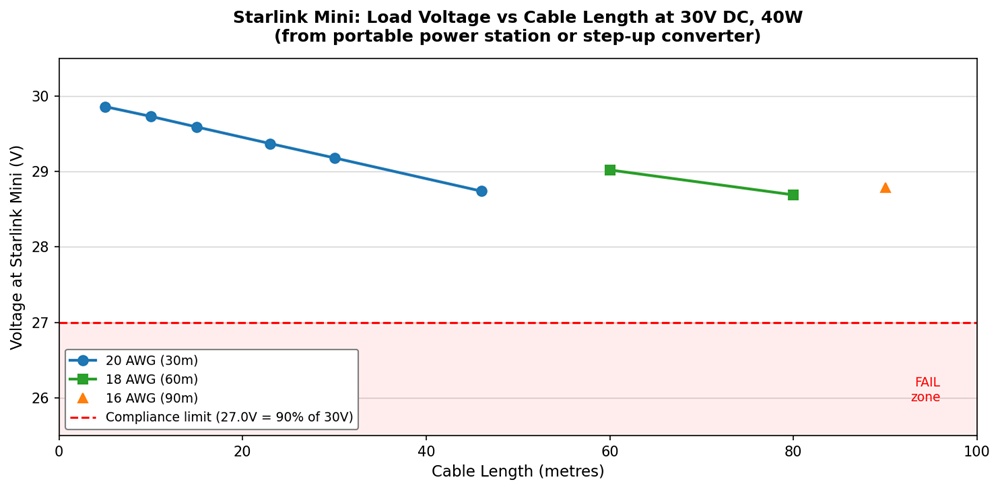
Figure 3: Load voltage at Starlink Mini vs cable length for 20, 18 and 16 AWG at 30V DC, 40W continuous load. Red dashed line shows 90% compliance threshold (27.0V).
Did You Know?
Most portable power stations include a USB-C PD port rated at 100W, but that does not mean you can run a long USB-C cable to your Starlink Mini and expect it to work. The USB-IF specification caps passive e-marked cables at 3 metres for Power Delivery compliance. Beyond that, voltage negotiation becomes unstable regardless of how capable your power station is. For runs longer than 3 metres, 30V DC is the engineered solution, and with the right cable gauge, it is reliable up to 60 metres or more.
Air Vision Systems stocks DC-DC step-up converters and power converters specified to run Starlink Mini from 12V and 24V portable power station outputs, engineered to the exact voltage, power, and protection requirements covered in this post. Browse the full range at Air Vision Systems Power Supplies.
Air Vision Systems stocks a full range of Starlink Mini compatible DC cables in 16, 18, and 20 AWG, every one selected and tested by Air Vision Systems to meet the compliance limits in this report. Match your cable gauge to your run length and get it right first time at Air Vision Systems Cables.
Frequently Asked Questions
Can I run Starlink Mini directly from a portable power station?
Yes, but the connection method matters. Use the USB-C PD port for runs up to 3 metres with a certified e-marked 5A cable, or 30V DC for longer runs — up to 30 metres on 20 AWG, 60 metres on 18 AWG, or 90 metres on 16 AWG cable. Direct connection from a 12V or 24V DC output without a step-up converter is not compliant beyond 2 to 3 metres.
Is USB-C or 30V DC better for powering Starlink Mini from a power station?
It depends on your run length. USB-C PD is the simpler option for short setups up to 3 metres. For anything longer, 30V DC is the engineered solution. It reduces current, cuts voltage drop, and supports cable runs of 30 to 60 metres or more depending on gauge.
What cable gauge do I need for a 30V DC run from my portable power station?
It comes down to distance. Use 20 AWG for runs up to 30 metres, 18 AWG for up to 60 metres, and 16 AWG for anything beyond 60 metres. These limits are based on worst-case continuous load of 40W and keep voltage drop within the 10% compliance threshold.
Not sure what length you need? See our guide on what length Starlink cable you need.
My power station only has 12V DC outputs. Can I still run Starlink Mini from it?
Yes, but you will need a 12V to 30V step-up converter. Mount it as close to the power station as possible, use at least 2.5mm² input wiring, and protect it with a 10 amp fuse. From the converter output, standard 30V DC cable sizing rules apply.
Does it matter which USB-C cable I use with my portable power station?
Yes. Only certified e-marked 5A USB-C cables are compliant for powering Starlink Mini at 20V. Standard non-e-marked cables are limited to 60W and should not be used beyond 2 metres. Always check the cable for e-mark certification before installation.
Not Sure Which Cable to Use? Try the AVS Starlink Smart Cable Calculator
If you want to run the numbers for your specific setup, different cable lengths, gauges, or voltages, the AVS Starlink Smart Cable Calculator does the hard work for you. It is built on the same engineering methodology behind this report, so you can plug in your setup and get a compliant result without doing the math by hand.
Try it here: AVS Starlink Smart Cable Calculator
The Right Connection Makes All the Difference
Running Starlink Mini from a portable power station is one of the most practical off-grid connectivity setups available, and with the right connection method and cable, it is fully engineered and compliant. Use USB-C PD for short runs up to 3 metres, switch to 30V DC for anything longer, match your cable gauge to your run length, and if your power station only outputs 12V, add a step-up converter close to the source. Follow those four steps and you have a reliable, compliant Starlink Mini installation wherever your power station can go.
The findings in this post come from a formal electrical engineering report prepared for Air Vision Systems, using the Bluetti AC2P as the reference power station and analysing compliance across USB-C PD, 30V DC, and high-voltage backbone configurations. The same engineering methodology sits behind our full Starlink cable compliance series, so the numbers are consistent across every post in the range.
If you want to check the numbers for your specific setup before you buy, use the AVS Starlink Smart Cable Calculator to run your exact cable length and gauge. Or browse the Air Vision Systems power supply and cable ranges to get everything you need in one place.
Ready to get your portable power station setup right?Use the free AVS Starlink Smart Cable Calculator, browse Air Vision Systems Power Supplies, or find the right cable at Air Vision Systems Cables.