
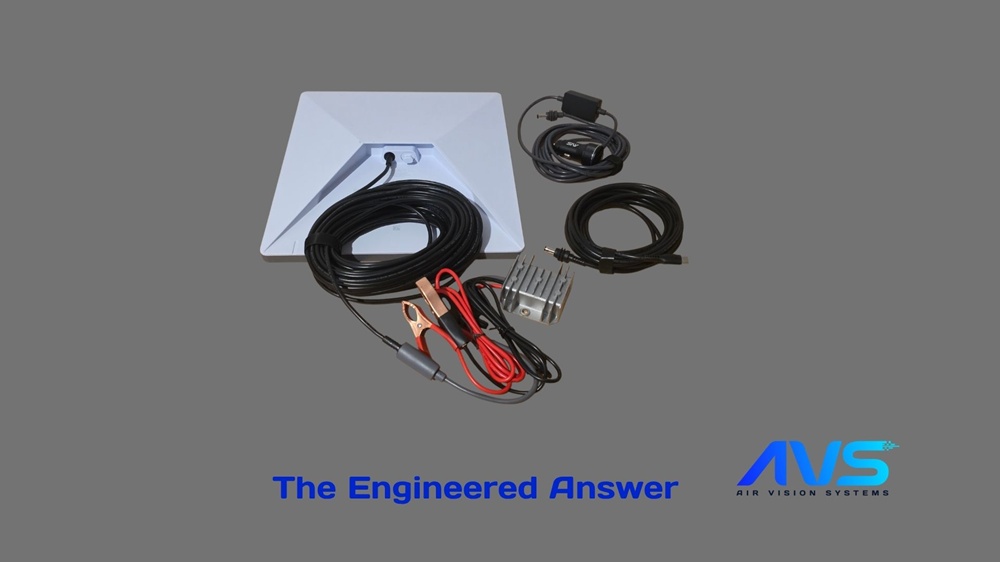
Engineering analysis conducted to IEC 60228 standards | Air Vision Systems | NZ and AU
If you’ve ever wondered about Starlink Mini cable length – or which cable you actually need for your setup – you’re not alone. Cable length and sizing is one of the most common questions we get, and the answer isn’t just trial and error. Air Vision Systems commissioned a full electrical engineering report to find the exact limits, and in this post we’re breaking down what it found in plain English.
Why This Matters for Your Starlink Installation
Most people installing Starlink Mini don’t think twice about the cable – they just use whatever came in the box or grab something off the shelf. But cable length and gauge directly affect how much voltage actually reaches your device. Too much drop and your Starlink becomes unreliable, drops connection, or won’t power on at all. Air Vision Systems had a licensed electrical engineer run the numbers across every realistic installation scenario – USB-C, DC runs, vehicle setups, off-grid – so you don’t have to guess.
What Was Tested
The report assessed every realistic way you might power a Starlink Mini – from a short USB-C cable off a power bank, to a 90 metre DC run on a remote property, to a structured Ethernet backbone on a commercial site. The engineer put three cable types through their paces: USB-C Power Delivery cables, two-conductor DC cables in 20, 18, and 16 AWG, and Cat5e/Cat6A structured cabling running at higher voltages with a step-down converter near the dish. Every configuration has to pass a strict threshold – the Starlink Mini must receive at least 90% of the source voltage to be considered compliant. Anything below that and you risk dropouts, instability, or the terminal simply refusing to operate.
How It Was Tested
A licensed electrical engineer carried out the analysis using standard electrical equations and copper conductor resistance data referenced against IEC 60228 – the international standard for insulated cable conductors. The engineer tested every cable type at fixed, real-world lengths: 5m, 10m, 15m, 23m, 30m, 46m, 60m, 80m, and 90m for DC runs, and 1m, 2m, 3m, and 5m for USB-C cables. For each length, the engineer calculated the voltage drop, the load voltage arriving at the Starlink Mini, and the power loss in the cable – recording a pass or fail against the 90% threshold. The load used throughout was 40W continuous, which represents the Starlink Mini running at full draw. No best-case scenarios – worst case, all the way through.
Key Findings – Starlink Mini Cable Length Limits Explained
Here’s what the testing confirmed. We’ve translated the technical results into plain language so you can match your setup to the right cable straight away.
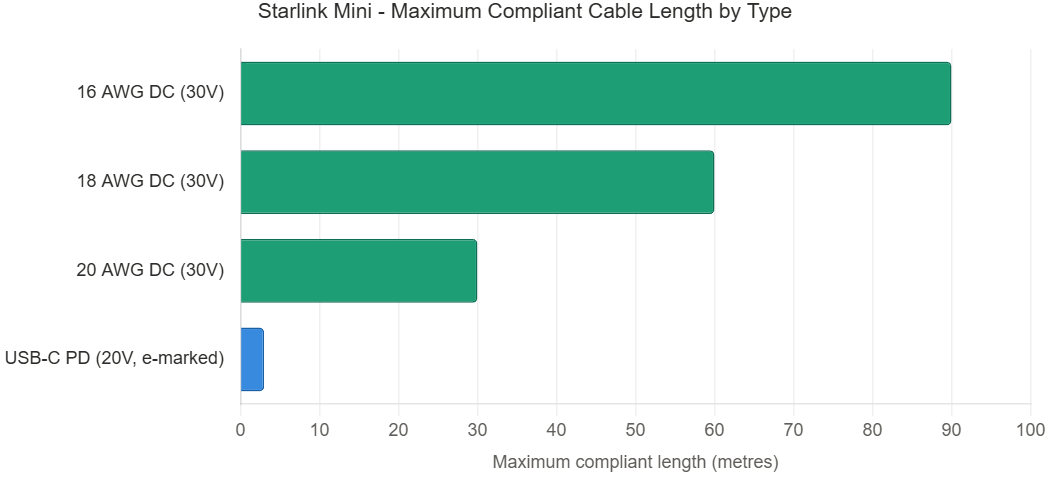
* All DC runs at 30V regulated, 40W continuous load. USB-C limit is USB-IF specification, not resistance-based.
Figure 1 – Maximum safe cable lengths for Starlink Mini by cable type and gauge at 30V DC, 40W continuous load
USB-C Power Delivery (20V)
• Certified e-marked 5A USB-C cables are fully compliant up to 3 metres
• In practice, many e-marked cables continue to work reliably at 5 metres
• Non-e-marked cables max out at 60W and should not be used beyond 2m
DC Cable Runs (30V regulated)
• 20 AWG cable – compliant up to 30 metres
• 18 AWG cable – compliant up to 60 metres
• 16 AWG cable – compliant up to 90 metres
• Running 30V DC instead of USB-C significantly reduces current draw, which is why you can go so much further
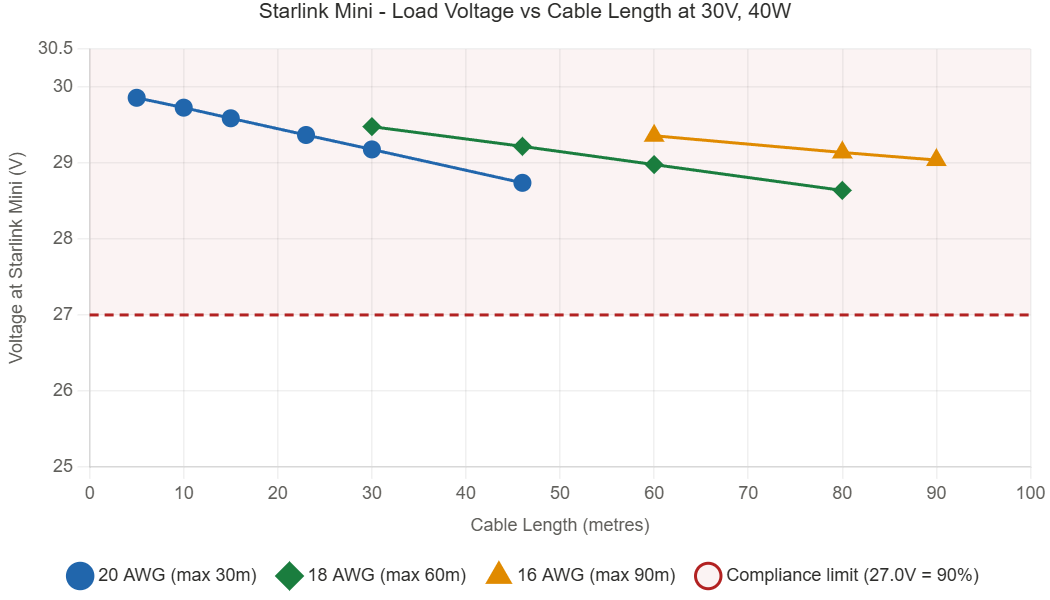
Figure 2 – Load voltage at Starlink Mini vs cable length for 20, 18, and 16 AWG at 30V DC, 40W load. Red dashed line shows the 90% compliance threshold (27.0V).
Structured Cabling (48V / 57V backbone)
• Cat5e or Cat6A 24 AWG running at 48V stays compliant up to 90 metres
• At 57V compliance extends to the full 100 metre channel length
• Both require a local step-down converter near the Starlink Mini to bring voltage back to 30V – but the long-run performance is the best of any configuration tested
What Doesn’t Work
• Direct 12V supply beyond 3 metres – voltage drop becomes a problem and a step-up converter to 30V DC is required
• Unverified or non-e-marked USB-C cables on runs longer than 2m
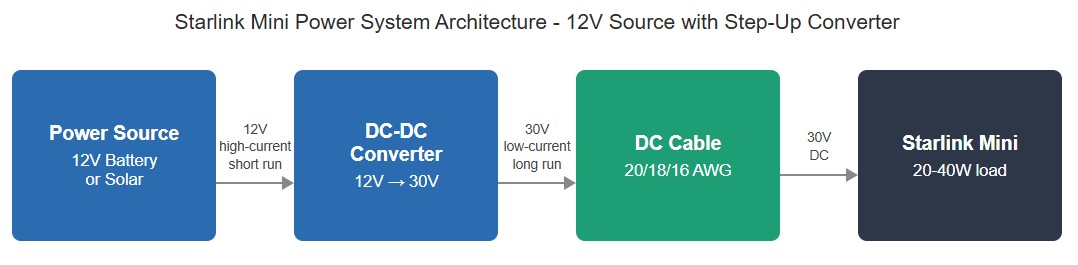
Figure 3 – Recommended system architecture for Starlink Mini on a 12V source. The converter mounts close to the power source, keeping the high-current 12V section short.
Did you know?Most standard USB-C cables are not e-marked – meaning they’re limited to 60W and shouldn’t be used beyond 2 metres to power your Starlink Mini. Only certified e-marked 5A cables are compliant to the USB-IF specification, and in practice these work reliably at up to 5 metres. It’s one of the most common installation mistakes, and it’s completely avoidable. |
Not sure which cable is right for your setup?
Air Vision Systems stocks a full range of Starlink Mini compatible cables – every one manufactured to meet the compliance limits in this report. Browse the range and get the right cable for your run length: Cables – Air Vision Systems.
Frequently Asked Questions
Can I use any USB-C cable to power my Starlink Mini?No. You need a certified e-marked 5A USB-C cable. Standard cables are limited to 60W and shouldn’t be used beyond 2 metres. Check your cable for the e-mark certification before installation.
What happens if my cable run is too long?If the voltage drop along your cable exceeds 10% of the source voltage, your Starlink Mini may become unstable, drop connection, or fail to power on altogether. Choosing the right cable gauge for your run length prevents this entirely.
Can I power Starlink Mini from my car?Yes. For short runs up to 3 metres from a car adapter, a direct connection works reliably. For longer runs you’ll need a step-up converter mounted close to your power source to bring the voltage up to 30V DC – then standard DC cable sizing rules apply. For most consistent results it would also be better to use a step-up converter for 3m.
Can I power Starlink Mini from a portable power station?Yes. Most portable power stations offer multiple ways to power Starlink Mini. Via USB-C PD, connect using a certified e-marked 5A cable – these work reliably up to 5 metres. Via a regulated 30V DC output, match your cable gauge to your run length: 20 AWG up to 30m, 18 AWG up to 60m, and 16 AWG up to 90m. Via the car adapter socket, a direct connection works reliably for short runs up to 3 metres – for anything longer, use a step-up converter to bring the voltage to 30V DC first.
Is Cat6A cable better than Cat5e for powering Starlink Mini?Electrically they’re identical for DC power runs at the same gauge. Cat6A is recommended for outdoor or commercial installs where mechanical durability and termination quality matter more.
How do I know what cable gauge I need?It comes down to run length. As a rule: 20 AWG up to 30m, 18 AWG up to 60m, and 16 AWG up to 90m, all at 30V DC. Not sure? Use the AVS Smart Cable Calculator to find the right spec for your exact setup. |
Not Sure Which Cable to Use? Try the AVS Smart Cable Calculator
If you want to run the numbers for your specific install – different cable lengths, gauges, or voltages – the AVS Smart Cable Calculator does the hard work for you. It’s built on the same engineering methodology behind this report, so you can plug in your setup and get a compliant result without doing the maths by hand.
Try it here: AVS Smart Cable Calculator
Final Thoughts
Getting your Starlink Mini cable right isn’t complicated once you know the limits. Use a certified e-marked USB-C cable for short runs, step up to 30V DC for anything longer, and match your cable gauge to your run length. These aren’t rules we made up – they come directly from a certified engineering report, tested against international standards including IEC 60228 and AS/NZS 3000.
At Air Vision Systems we don’t just sell Starlink accessories – we engineer them. Air Vision Systems manufactures every cable in our range to meet the compliance limits outlined in this report, so you can install with confidence knowing the numbers have been checked by a licensed electrical engineer.
Ready to get the right cable for your setup?Browse the full AVS cable range at shop Starlink Mini cables or use our free AVS Smart Cable Calculator to find the exact spec for your run length. |