

If you are running Starlink Mini from a vehicle, the question is not just whether it will work. It is whether your cable setup will deliver enough power to keep it working reliably at speed, over distance, and in real conditions. Get the cable length or gauge wrong and your Starlink Mini will drop out, undervolt, or simply fail to perform. Get it right and you have fast, stable satellite internet wherever the road takes you.
The problem is that the rules are not obvious. A 12V vehicle supply, a USB-C cable, a DC extension lead, they all behave differently depending on length, gauge, and voltage. This post breaks down exactly what the engineering says and shows you how to use the AVS Smart Cable Calculator to get the right answer for your specific setup in seconds.
Why Your Vehicle’s 12V Supply Is Not Enough on Its Own
Most vehicles run a 12V electrical system. It powers your lights, your accessories, your fridge. So it is natural to assume it will power your Starlink Mini too. It will, but only if the setup is done correctly, and that means understanding one fundamental problem: current.
At 12V, powering a 40W device like Starlink Mini requires 3.33 amps of current. That sounds manageable, but current is the enemy of long cable runs. The higher the current flowing through a cable, the more voltage is lost along the way. Our engineering analysis, conducted to IEEE, IEC, and AS/NZS 3000 standards, confirms that at 12V, voltage drop along the cable exceeds the 10% compliance threshold at distances beyond 2 to 3 metres. Beyond that point, the Starlink Mini receives less than the minimum voltage it needs to operate reliably. It may power on, but it will drop out, perform inconsistently, or fail to maintain a stable connection.
The solution is a step-up converter mounted close to your 12V source. This boosts the vehicle supply to a regulated 30V DC output before it travels down the cable to the dish. At 30V, the current drops to 1.33 amps, which is less than half of what it was at 12V. That lower current means far less voltage drop over distance, and far longer cable runs that stay within compliance limits.
This is exactly the scenario the AVS Smart Cable Calculator is built for. Select Starlink Mini, select 12V car socket as your power source, enter your required cable length, and the calculator will tell you instantly whether you need a converter and which cable gauge to use.
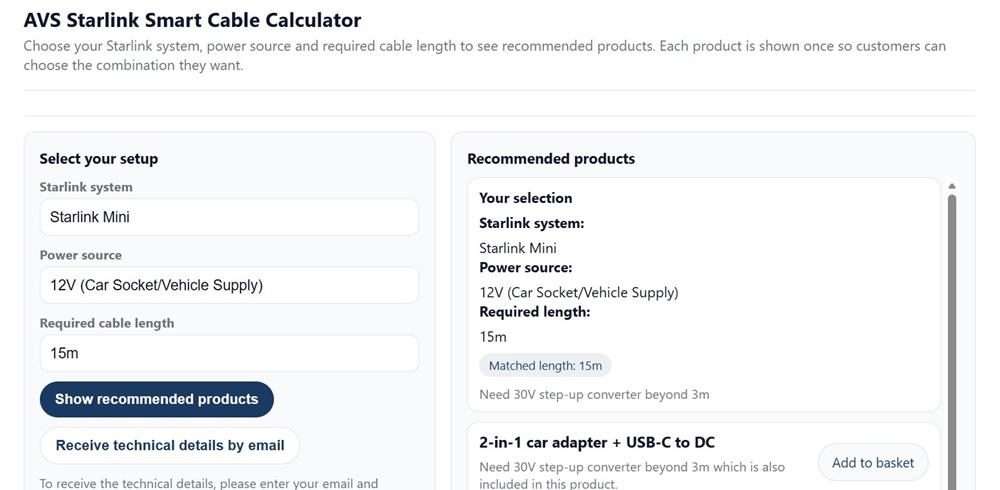
The AVS Smart Cable Calculator: select your Starlink model, power source, and cable length to get an instant engineered recommendation.
The 30V Solution: How a Step-Up Converter Changes Everything
Once you introduce a step-up converter between your vehicle’s 12V supply and your Starlink Mini, the entire cable length picture changes. The converter takes your vehicle’s 12V DC output and steps it up to a regulated 30V DC output. That higher voltage means lower current, and lower current means you can run much longer cables while staying within safe compliance limits.
Our engineering analysis confirms the following safe cable lengths at 30V DC under a continuous 40W load:
• 20 AWG two-conductor cable: compliant to 30 metres
• 18 AWG two-conductor cable: compliant to 60 metres
• 16 AWG two-conductor cable: suitable for runs beyond 60 metres
For most vehicle installations, 20 AWG to 30 metres will cover the majority of setups. Longer vehicles, roof-mounted dishes on large motorhomes, or cable runs that travel through a chassis will benefit from stepping up to 18 AWG.
One installation detail that matters: the converter must be mounted as close as possible to the 12V source, not halfway along the cable run. The high-current section of the circuit is the 12V input side, so keeping that lead short is critical. The engineering report specifies a minimum 10A fuse or circuit breaker on the converter input for Starlink Mini installations. This is not optional. It protects both the converter and your vehicle wiring from fault conditions.
Not sure which gauge or length is right for your specific vehicle setup? That is exactly what the AVS Smart Cable Calculator is designed to answer. Select your Starlink model, your power source, and your required cable length, and it will return the correct product recommendation instantly.
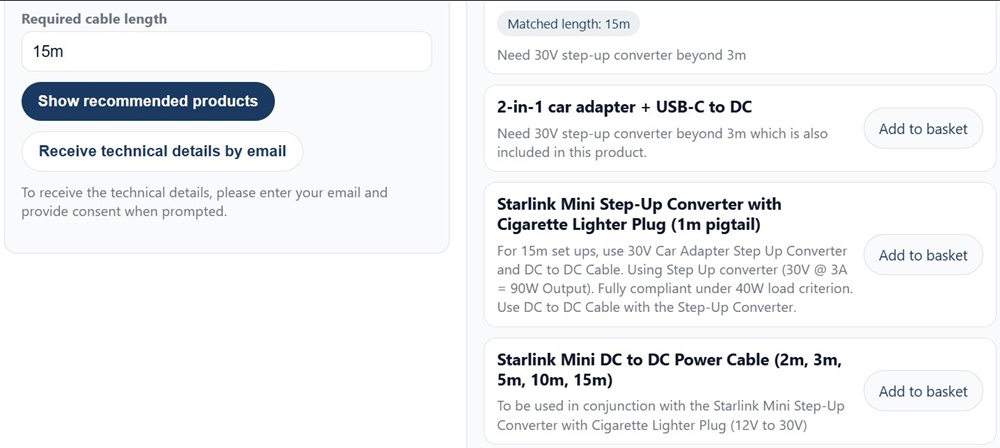
The calculator results panel showing the step-up converter recommendation and matched cable length for a 15 metre vehicle run.
USB-C PD in a Vehicle: When It Works and When It Does Not
Starlink Mini supports two power input methods: 30V regulated DC and 20V USB-C Power Delivery. In a vehicle context, USB-C PD is appealing because it is simple, the cable is lightweight, and many portable power stations and vehicle adapters offer a USB-C PD output. But there are strict limits that the engineering confirms and ignoring them will cause problems.
First, the cable itself matters more than most people realise. Not all USB-C cables are created equal. For Starlink Mini to receive a stable 20V 40W supply over USB-C, you need a certified e-marked cable. An e-marked cable contains a small identification chip inside the connector that communicates with the power source to negotiate the correct 20V 5A profile. Without that chip, the cable is limited to 3A, which is borderline for Starlink Mini at full load and is not certified compliant. Always check that your USB-C cable is e-marked and rated for 5A before using it to power your dish.
Second, length is tightly restricted. Our engineering analysis confirms that passive e-marked USB-C PD cables are compliant to a maximum of 3 metres. Beyond that, voltage drop at 20V causes the delivered voltage to fall outside the acceptable range for stable operation. Active cables, which contain an IC chip to maintain signal integrity along the cable, can extend this to around 5 metres, but operational stability beyond 3 metres cannot be fully guaranteed and depends on the specific cable and power source combination.
The Practical Takeaway for Vehicle USB-C Installs
The practical takeaway for vehicle installs is straightforward. If your Starlink Mini is within 3 metres of your power source, a certified e-marked USB-C PD cable is a clean and simple solution. If you need more than 3 metres, switch to 30V DC distribution with the appropriate cable gauge as covered above. Trying to extend a USB-C PD run beyond its limits is one of the most common causes of Starlink Mini dropouts in vehicle installations.
Use the AVS Smart Cable Calculator to check your setup. If your cable length exceeds the USB-C PD limit for your configuration, the calculator will flag it and recommend the correct 30V DC alternative.
What Happens If You Get It Wrong: Undervoltage and Why It Matters
It is tempting to think that a cable that is slightly too long or slightly too thin will just mean slower speeds. In reality the consequences are more disruptive than that, and they are not always obvious to diagnose.
When Starlink Mini receives less than 90% of its required input voltage, its internal power regulation stage begins to struggle. The device may still power on, and it may even appear to connect, but sustained undervoltage causes a predictable set of problems. Connection dropouts at random intervals. Failure to maintain a stable link under load. The dish cycling off and on as the internal protection circuit responds to the low voltage condition. In some cases the terminal will simply refuse to initialise correctly at startup.
The 90% voltage retention threshold used throughout our engineering analysis is not an arbitrary figure. It is the compliance limit derived from IEEE, IEC, and AS/NZS 3000 standards and applied consistently across all cable length and gauge calculations in the report. A configuration that delivers less than 90% of source voltage at the device input is defined as non-compliant, regardless of whether the device intermittently powers on. Powering on is not the same as operating correctly.
Why Vehicle Installs Are More Vulnerable
In a vehicle environment this problem is compounded by real world variables that the theoretical calculation does not fully account for. Connector resistance adds a small but measurable voltage drop at every join. Temperature affects conductor resistance, with higher ambient temperatures increasing resistance slightly. Vibration over time can degrade connector contact quality. These factors are why the engineering report applies conservative safe working limits, and why the AVS Smart Cable Calculator builds in appropriate margins when recommending cable lengths and gauges for your specific setup.
The short version: do not guess. The consequences of getting it wrong are a Starlink Mini that drops out at the worst possible moment, and a fault that can be genuinely difficult to trace back to the cable.
Choosing the Right Setup for Your Vehicle: A Practical Summary
Every vehicle installation is different. The distance from your power source to your Starlink Mini, the gauge of cable you run, and the way you manage your 12V supply all combine to determine whether your setup will be stable and compliant. Here is a practical summary of the three main scenarios.
Short run, simple setup (up to 3 metres)
If your Starlink Mini is within 3 metres of a USB-C PD capable power source such as a portable power station or a vehicle USB-C adapter, a certified e-marked 5A USB-C cable is your simplest option. Make sure the cable is genuinely e-marked and rated for 100W. Keep the total cable length including any extensions to 3 metres maximum.
Medium run from a vehicle supply (3 metres to 30 metres)
This is the most common vehicle scenario. You need a step-up converter mounted close to your 12V source, a regulated 30V DC output, and a 20 AWG two-conductor DC cable run to the dish. The engineering confirms this setup is compliant to 30 metres under continuous 40W load. Fit a 10A fuse on the converter input.
Longer run in a large vehicle or motorhome (30 metres to 60 metres)
Step up to 18 AWG two-conductor cable. Everything else stays the same. The engineering confirms compliance to 60 metres at 30V DC with 18 AWG. For runs beyond 60 metres, move to 16 AWG.
The AVS Smart Cable Calculator covers all of these scenarios. Select Starlink Mini, choose your power source, enter your cable length, and it will return the correct product recommendation for your exact setup. No guesswork, no undersized cables, no dropouts.
The cable length limits in this post are derived from a certified electrical engineering compliance report prepared for Air Vision Systems to IEEE, IEC, and AS/NZS 3000 standards.
All configurations are calculated at continuous 40W load with a 90% minimum voltage retention threshold at the device input.
These are not estimates. They are engineered compliance limits designed to ensure your Starlink Mini operates reliably in a vehicle environment.
Use the AVS Smart Cable Calculator
Frequently Asked Questions
Can I power Starlink Mini directly from my car’s 12V socket?
Yes, but not directly to the dish. Your vehicle’s 12V supply needs to be stepped up to 30V DC via a converter before it travels down the cable to your Starlink Mini. Without a converter, the high current required at 12V causes voltage drop that exceeds safe compliance limits at distances beyond 2 to 3 metres. Mount the converter as close as possible to your 12V source, fit a 10A fuse on the input, and run your 30V DC cable from there to the dish.
What is an e-marked USB-C cable and do I need one?
An e-marked USB-C cable contains a small identification chip inside the connector that communicates with your power source to negotiate the correct 20V 5A power profile. Without it, the cable is limited to 3A which is borderline for Starlink Mini at full load and is not certified compliant. If you are powering Starlink Mini via USB-C PD in your vehicle, you need a certified e-marked 5A cable. Check the cable packaging or product listing for e-mark certification before purchasing.
How do I know if my Starlink Mini is suffering from undervoltage?
The most common symptoms are random connection dropouts, the dish cycling off and on, failure to maintain a stable link under load, or the terminal not initialising correctly at startup. These symptoms can be difficult to trace back to the cable because the device may still appear to power on. If you are experiencing intermittent issues and your cable run is long or your cable gauge is light, undervoltage is one of the first things to check.
Can I extend my USB-C cable beyond 3 metres in my vehicle?
Passive e-marked USB-C PD cables are compliant to 3 metres maximum. Active cables, which contain an IC chip to maintain signal integrity, can extend this to around 5 metres, but operational stability beyond 3 metres cannot be fully guaranteed and depends on the specific cable and power source combination. If you need more than 3 metres, the recommended approach is to switch to 30V DC distribution with the appropriate cable gauge. The AVS Smart Cable Calculator will confirm the right setup for your required length.
Does cable gauge really make a difference in a vehicle installation?
Yes, significantly. AWG (American Wire Gauge) is a measure of conductor thickness. A lower AWG number means a thicker conductor with lower resistance per metre. In a vehicle installation running 30V DC to Starlink Mini, the engineering confirms the following safe limits under continuous 40W load: 20 AWG is compliant to 30 metres, 18 AWG is compliant to 60 metres, and 16 AWG is suitable for runs beyond 60 metres. Using a cable that is too thin for your run length is one of the most common causes of undervoltage issues in vehicle Starlink installations.
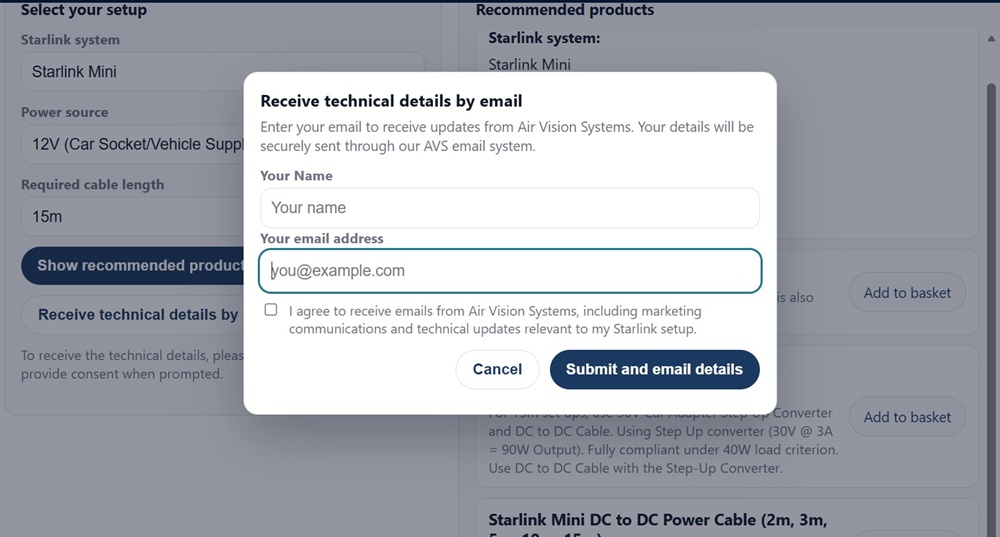
The AVS Smart Cable Calculator lets you receive the full technical details by email for your records.
The Right Setup Makes All the Difference
Powering Starlink Mini from a vehicle is straightforward when the setup is done correctly. The engineering is clear: direct 12V beyond 2 to 3 metres is non-compliant, USB-C PD works reliably to 3 metres with a certified e-marked cable, and 30V DC distribution with the right cable gauge is the solution for anything longer. Get those fundamentals right and you have stable, reliable satellite internet wherever the road takes you.
The figures in this post are not estimates or general guidance. They are derived from a certified electrical engineering compliance report prepared for Air Vision Systems to IEEE, IEC, and AS/NZS 3000 standards, calculated at continuous 40W load with a 90% minimum voltage retention threshold. The same engineering that underpins these limits is built directly into the AVS Smart Cable Calculator.
Stop guessing and get the right answer for your exact setup in seconds.
Browse the full range of cables for your vehicle install at airvisionsystems.co.nz/cables
Use the AVS Smart Cable Calculator